Project changelog
The project changelog records the evolution of the design inside the .gddkit file. It is useful for handoffs, publisher reviews, milestone comparisons, and explaining why a system changed.
Open the changelog
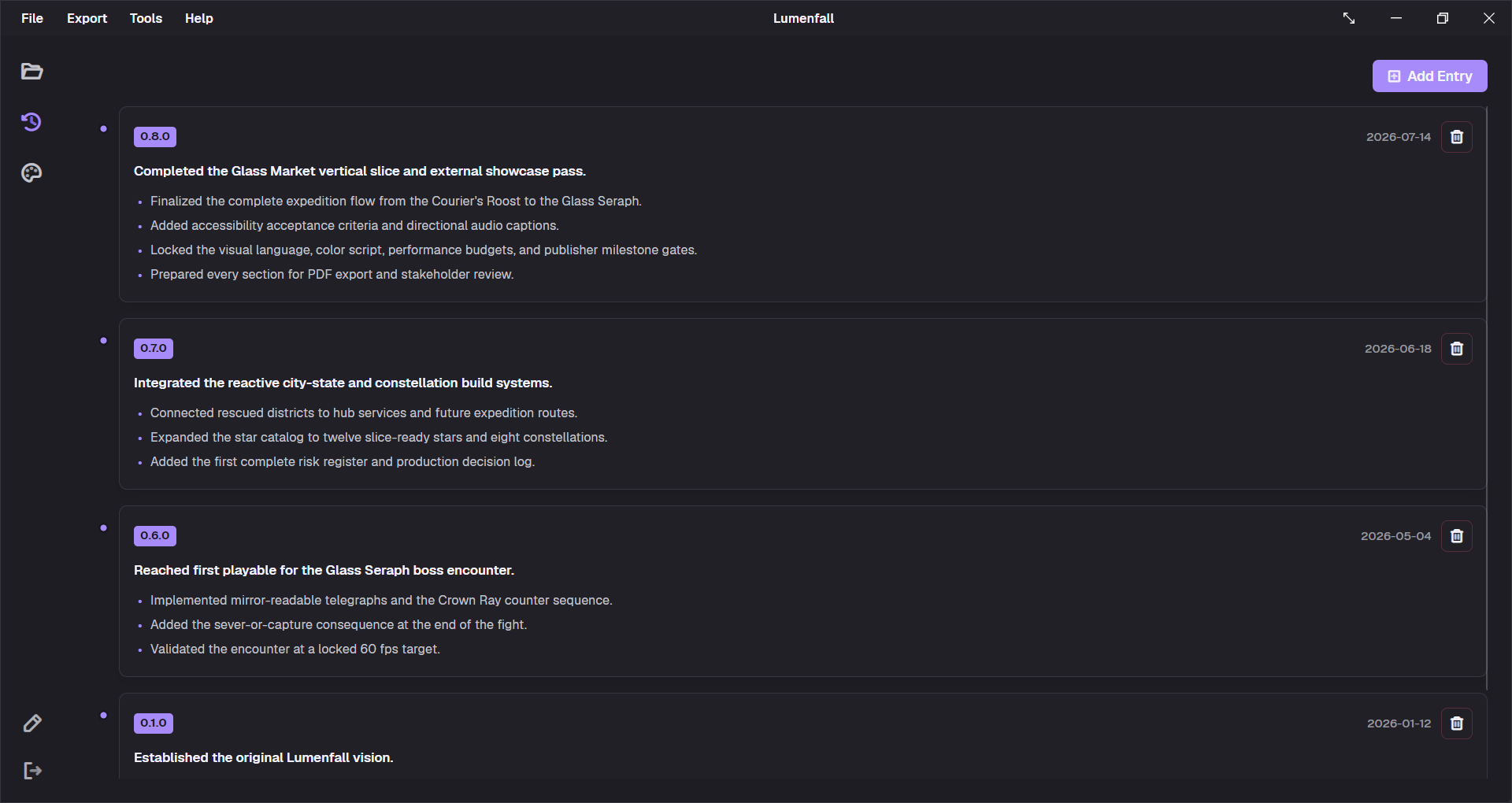
Use the Changelog icon in the left navigation rail or Help → View Changelog. The page displays entries as a timeline, newest first.
Each entry contains:
- Version: a free-text version label;
- Date: the effective milestone or change date;
- Summary: one short statement of the release’s intent, up to 160 characters;
- Entries: one change per line, rendered as bullets.
Add an entry
- Select
Add Entry. - Confirm or replace the proposed version.
- Choose the date.
- Write a concise summary.
- Enter each detailed change on its own line.
- Save the entry.
When the current version is a valid three-part version such as 0.4.2, the dialog can propose the next patch version, 0.4.3. The field does not enforce Semantic Versioning, so labels such as Prototype-3 are possible. For predictable sorting and communication, prefer MAJOR.MINOR.PATCH.
Adding an entry also updates the project’s current version to that entry’s version.
Write useful changes
Prefer outcomes and decisions over activity logs:
SummaryLocked the vertical-slice combat loop for external playtesting.
Detailed changesReduced dash recovery from 450 ms to 320 ms.Added a stamina warning below 20%.Removed the temporary heavy-attack cancel.Documented keyboard and controller remapping requirements.
A useful entry lets a reader answer three questions: what changed, why now, and what should be reviewed next? Put long rationale in the relevant document section and use the changelog to point to the decision.
Edit or delete an entry
v2 can add and delete changelog entries, but does not provide an edit-entry workflow. If an entry contains a mistake, copy its text, delete it with confirmation, and create a corrected entry.
Sorting behavior
Entries are displayed by date and then by parseable version, descending. Free-form version labels do not have a reliable Semantic Version order, which is another reason to use consistent versions and distinct dates.
Changelog in exports
Both exporters append a Changelog & History section after the ordered document sections:
- Markdown uses version/date headings, italic summaries, and bullet lists.
- PDF uses the active theme’s changelog layout.
The changelog is project history, not application release notes. Use it for the game or product being designed; use Help → Check for Updates for GDDKit itself.